Charles TechCharles Tech
  • Tests High-Tech
    • Smartphones
      • iPhone
      • Asus
      • Huawei
      • Poco
      • Samsung
      • Xiaomi
    • Ordinateurs
      • PC fixe / gamer
      • PC portables
    • Composants PC
      • Cartes Graphiques
      • Processeurs
      • SSD
    • Eléctromenager
      • Aspirateurs robots
    • Périphériques
      • Claviers
      • Souris
  • Actu Tech
  • Bons plans
  • Dossiers
  • Guides d’achat
  • Tutos
  • English
    • Deutsch
    • Español
    • Italiano
    • Français
    • 日本語
    • Polski
Vous lisez How to convert a Google Sheet document to PDF
Font ResizerAa
Charles TechCharles Tech
Font ResizerAa
Rechercher ...
  • Tests High-Tech
    • Smartphones
    • Ordinateurs
    • Composants PC
    • Eléctromenager
    • Périphériques
  • Actu Tech
  • Bons plans
  • Dossiers
  • Guides d’achat
  • Tutos
  • English
    • Deutsch
    • Español
    • Italiano
    • Français
    • 日本語
    • Polski
Suivez-nous
Charles Tech > All our High-Tech tips and tutorials > How to convert a Google Sheet document to PDF

How to convert a Google Sheet document to PDF

Le Geek
Le Geek
Published: 28/04/2024
Last updated: 28/04/2024
Ce site utilise des liens affiliés qui participent aux revenus du site. En les utilisant, ça ne vous coûte pas plus cher, mais un pourcentage nous est reversé pour continuer à vous informer et à proposer des tests toujours plus complets.
Partager
Résumer avec :
ChatGPT ChatGPT
Grok Grok
Perplexity Perplexity
Claude Claude
Sommaire
  • Download a Google Sheet as a PDF file
  • Convert a Google Sheet to PDF using it as an attachment
  • Convert a Google Sheet using an online converter

Spreadsheets have become an indispensable tool for data management and information analysis. However, when it comes to sharing this information with others, it can be difficult to ensure that everyone has the same version of the file, especially if recipients don’t have access to the same spreadsheet application. That’s where converting a spreadsheet to PDF comes in. By converting a Google Sheet to PDF, you can be sure that the layout, formulas and data are preserved and can be viewed on any device.

Download a Google Sheet as a PDF file

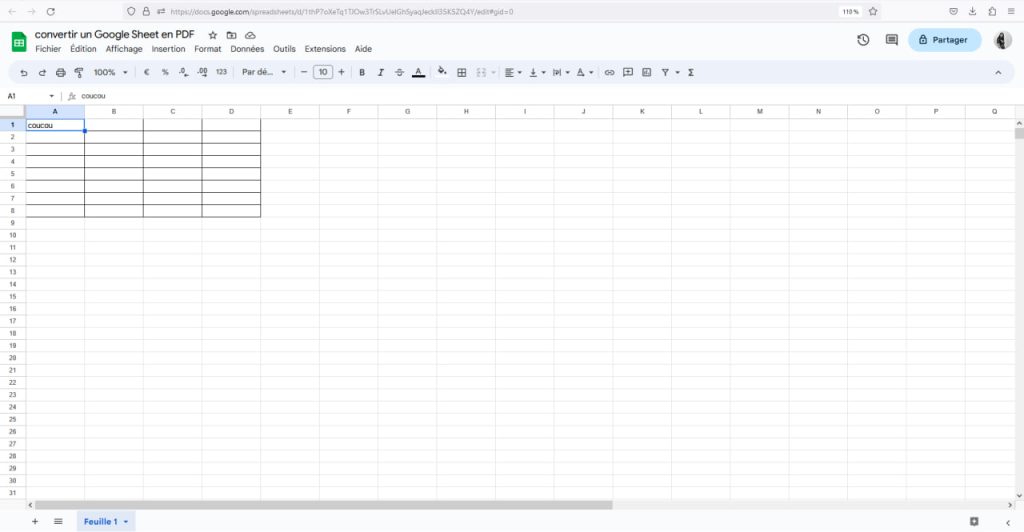
To do this, go to the spreadsheet you wish to convert:

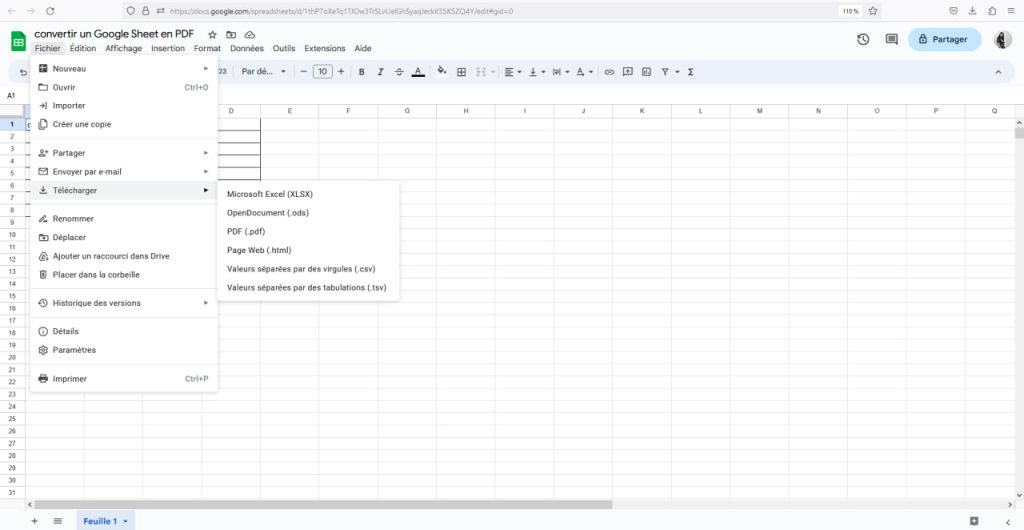
  • Click on “File”
  • Move your cursor over “Download” and select “PDF (.pdf)” from the drop-down menu
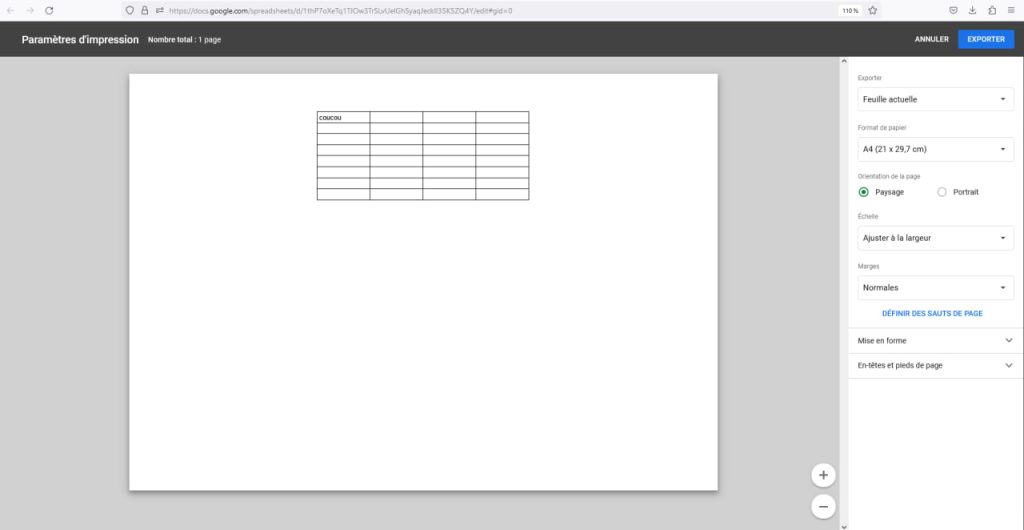
  • Choose the parameters you require and press “Export”.
D'autres articles intéressants

5 tips for your AirPods that you never knew existed
How do I change the folder in which I save screenshots on a Mac?
How to change the sound of iPhone notifications?
How to blur your home on Google Maps?
How to recover deleted photos on iPhone?
convertir google sheet en pdf
Étape 1 : Cliquez sur “Fichier”
convertir feuilles de calcul en pdf
Étape 2 : Déplacez votre curseur sur “Télécharger” et sélectionnez “PDF”
google sheet convertit en pdf
Étape 3 : Appuyez sur “Exporter”
All that’s left to do is choose where you want to save it and rename the file. By default, it will appear in your download location.

Convert a Google Sheet to PDF using it as an attachment

Here’s how to do it:

  • As for the previous method, click on “File”.
  • Go to “Send by e-mail” and then click on “Send this file by e-mail”.
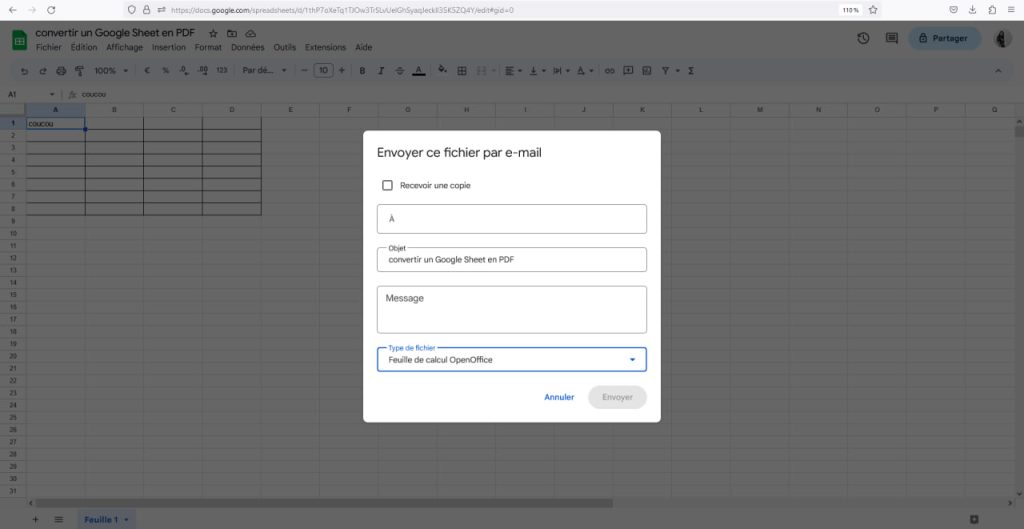
  • Next, simply fill in this short form: enter the recipient’s e-mail address, change the subject, etc.
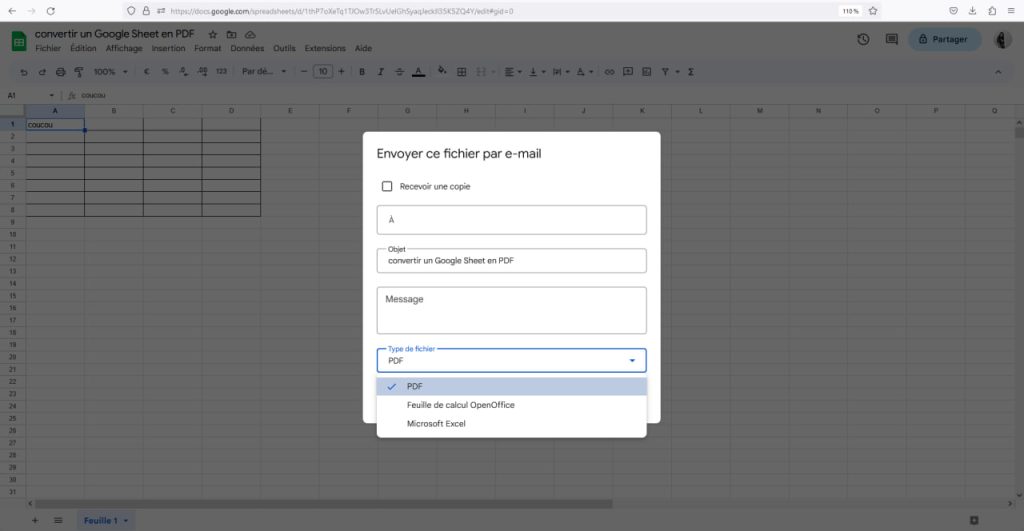
  • Click on “File type” and select “PDF”.
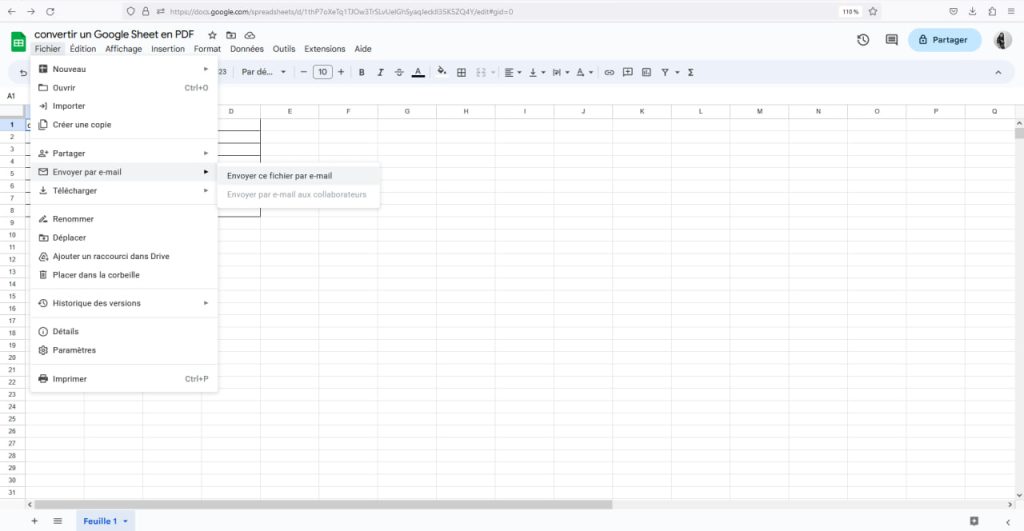
convertir google sheet en pdf
Étape 1 : Cliquez sur “Fichier”
convertir un google sheet en pdf
Étape 2 : Appuyez sur “Envoyez ce fichier par e-mail”
convertir une feuille de calcul en pdf
Étape 3 : Remplissez le formulaire
convertir excel en pdf
Étape 4 : Cliquez sur “Type de fichier” et sélectionnez “PDF”
Now all you have to do is send it to the recipient and/or to your own e-mail address if you want a copy.

Convert a Google Sheet using an online converter

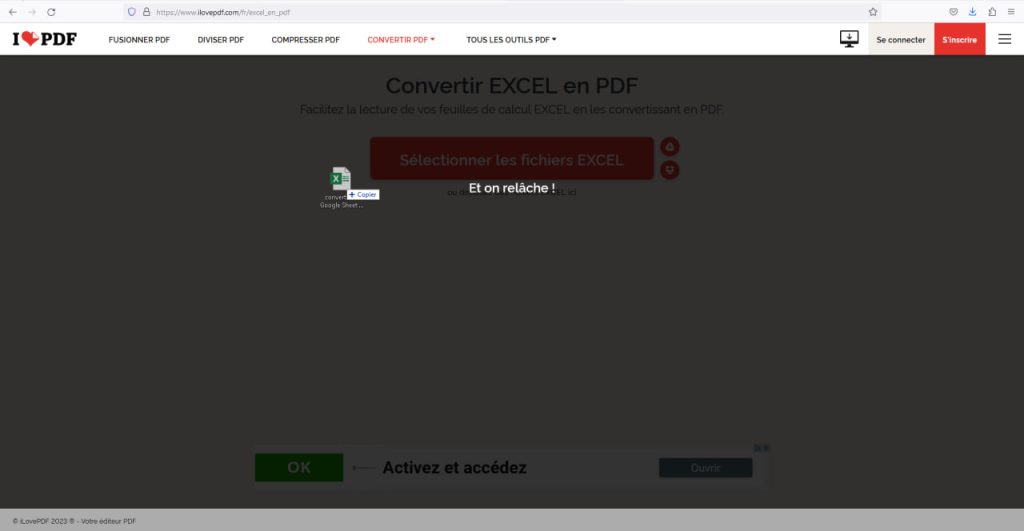
You can use online converters if the previous methods don’t suit you. This applies to all spreadsheets saved on your computer. We’ve chosen to show you how with the “iLovePDF” online converter. After downloading your spreadsheet, go to ilovepdf.com :

  • Select “Excel to PDF”.
  • Once this is done, drag and drop your spreadsheet or select the file(s) you wish to convert.
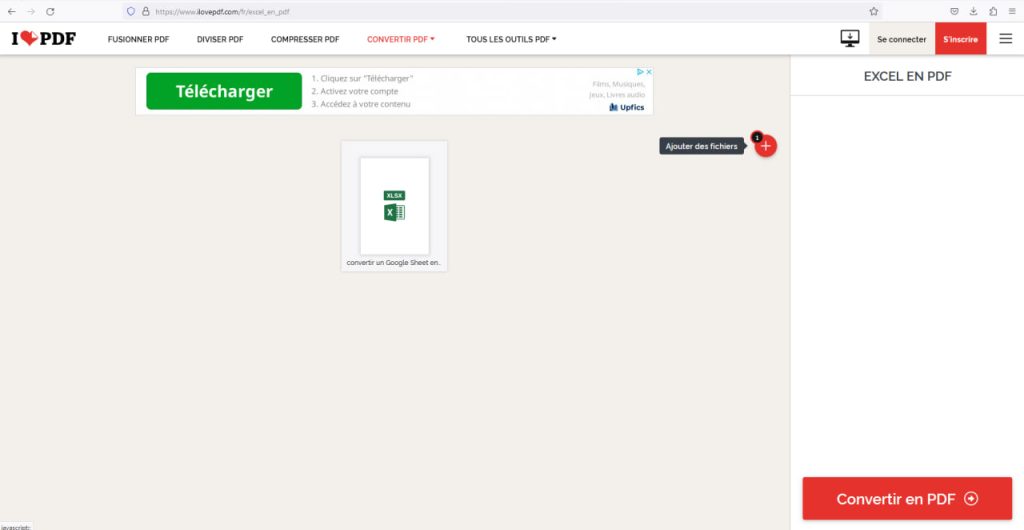
  • Click on “Convert to PDF”.
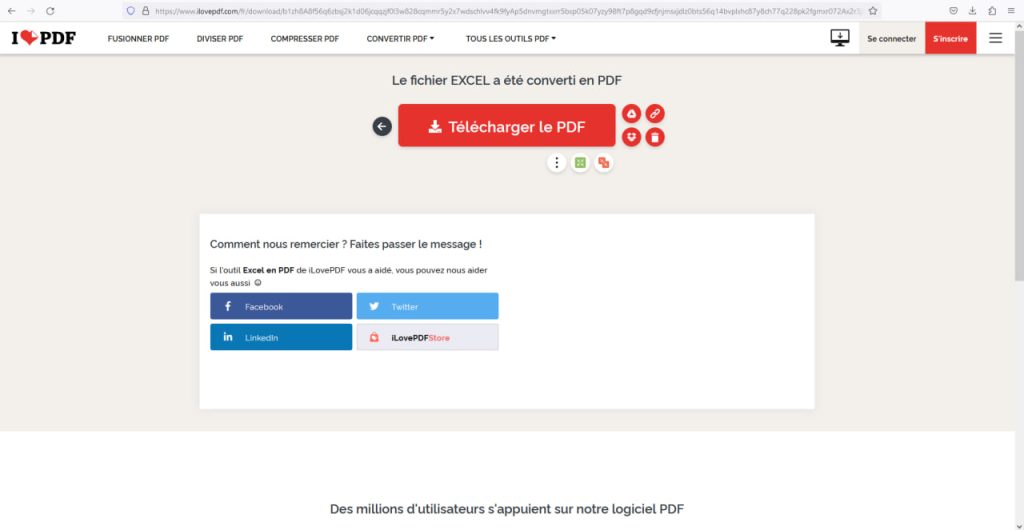
  • Finally, simply click on “Download PDF file”.
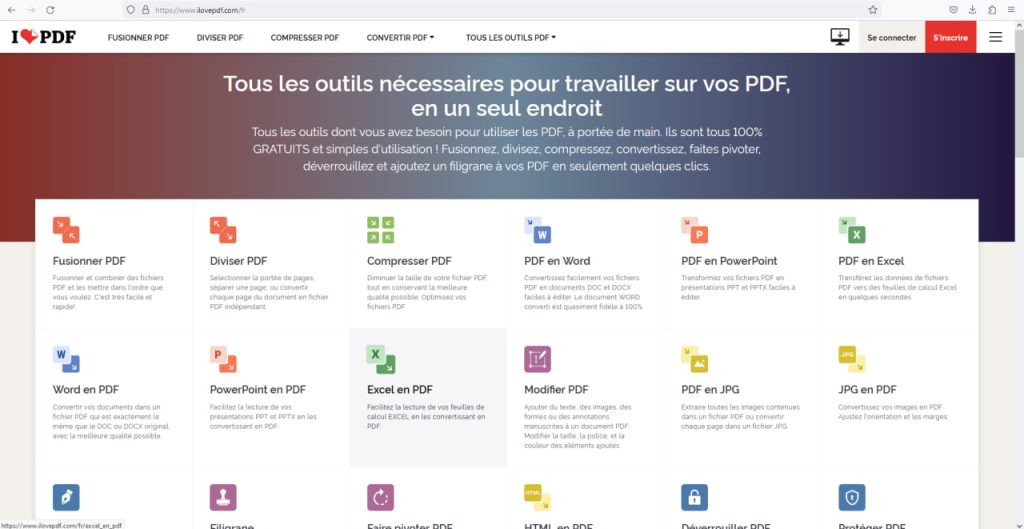
Étape 1 : Appuyez sur “Excel en PDF”
Étape 2 : Glissez ou sélectionnez les fichiers que vous souhaitez convertir
Étape 3 : Cliquez sur “Convertir en PDF”
Étape 4 : Appuyez “Télécharger le fichier PDF”
You’ll find your PDF in your downloads and can share it as you wish.
Partager cet article
Facebook Email Copy Link Imprimer
Laisser une note

Laisser une note Cancel reply

Your email address will not be published. Required fields are marked *

Sélectionnez une note

Notre partenaire

offre nordvpn

Réseaux sociaux

23kLike
38kSuivre
170Suivre
2.8kAbonnement
10.8kSuivre
1.1kSuivre
34Suivre

Vous aimerez aussi ...

Here’s how to change your Outlook password

28/04/2024

How do I unblock a user on Instagram?

28/04/2024

How do I cancel an Apple One subscription?

28/04/2024
gif iphone

How do I create a GIF with my iPhone?

28/04/2024

A ne pas louper !

Le streaming TV : la nouvelle ère du divertissement à portée de clic avec Mondial TV
Bons plans
honor 400 appareil photo
C’est le moment de profiter du Honor 400 à prix sacrifié
Bons plans
honor 400 appareil photo
Honor 400 : profitez de la promo de lancement avant qu’il ne soit trop tard
Bons plans
  • Annoncer sur CharlesTech
  • Mentions légales
  • Contactez nous
  • À propos
  • Plan de site
© Charles Tech 2017 - 2025 - Toute reproduction (même partielle) interdite sous peine de poursuites.
Re !

Connectez-vous

Username or Email Address
Password

Vous avez perdu votre mot de passe ?