


SSDs offer incredible speeds compared to mechanical hard drives, and with M.2 NVMe SSDs, no cables are needed. They are an attractive investment that can boost your PC’s performance. Here’s our ranking of the best M.2 NVMe SSDs, based on price and performance. Because the more powerful an M.2 SSD is, the more expensive it is.
The best affordable SSDs in 2024
In 2024, owning an affordable NVMe SSD has several advantages. First, this technology offers ultra-fast read and write speeds, which significantly increases the performance of computer systems. In addition, the design with no moving parts ensures greater reliability and durability, while power efficiency helps extend the battery life of portable devices. In short, an affordable NVMe SSD is a worthwhile investment for those looking for high performance without spending a fortune.
Lexar NM620


The Lexar NM620 is a high-quality SSD with impressive read and write performance. Its data transfer rates are consistent and demonstrate the use of high quality components. Priced very affordably, it is an excellent choice for boosting the performance of a memory hungry PC at a very affordable price.
Western Digital WD Red SN700
With perfect stability and good overall performance, the Western Digital WD Red SN700 is an interesting choice. It delivers satisfactory results, although it may present some difficulties when processing large write volumes or very small amounts of data, a situation common to many models. Overall, however, it remains a reliable and powerful option.
Western Digital WD Blue SN570
The WD Blue SN570 offers excellent performance and stability, making it extremely pleasant to use. Its simple design, though inelegant to some, can easily be improved by adding a heatsink to lower the temperature and integrate it harmoniously into a PC. All in all, its impressive performance makes it a very attractive storage option.
Best PCIe 4 SSDs in 2024.
This year, the technological development of PCIe 4 NVMe SSDs has reached new heights in terms of performance and reliability. With impressive read and write speeds, these storage devices are redefining the standards of modern computing.
In this part of the guide, we explore the best PCIe 4 SSDs available on the market in 2024, highlighting their features and their ability to meet the high-performance storage needs of the most demanding users. Of course, for any type of SSD, you must have a PCIe 4 or PCIe 5-compatible motherboard in an NVMe slot. Otherwise, major problems can arise. So make sure of this before choosing one of the following models.
Lexar NM790

The Lexar NM790 is a high-quality SSD that delivers exceptional performance. It features exemplary stability and takes full advantage of the performance offered by the PCIe Gen 4 connector. This combination makes it an ideal storage option. This combination makes it an ideal storage option for those seeking maximum performance and flawless reliability.
Crucial T500
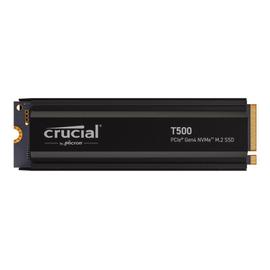


The Crucial T500 offers fast, reliable data transfer speeds and exemplary stability. With a performance of up to 7000 MB/s, it lives up to its promises. It is an excellent choice among internal SSDs for those who want to boost their computer’s performance or create a solid configuration.
Samsung 990 Pro
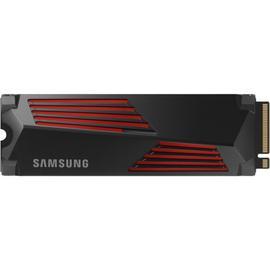


The Samsung 990 Pro is a premium SSD that combines excellent performance with remarkable stability. Although it belongs to Samsung’s ‘Pro’ range, it is reasonably priced considering its features. Of course, it is a bigger investment than a regular SATA SSD, but for the features it offers, it is quite affordable.
Corsair MP600 Pro XT
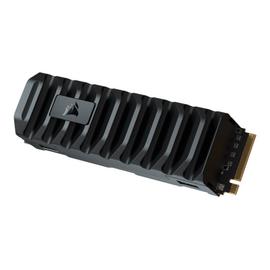

The Corsair MP600 Pro XT is a high-performance NVME SSD and its heatsink is very efficient, ensuring optimal performance even under heavy load. Although it can get a bit warmer than other SSDs at idle, temperatures are kept within acceptable limits. Data transfer speed is somewhat slower than advertised, but can be significantly improved by configuring two SSDs in RAID 0. It is therefore an excellent choice for anyone in need of a disk drive. It is therefore an excellent choice for those who value high performance and reliability.
Best PCIe 5 SSDs in 2024
In 2024, the NVME PCIe 5 SSD will be the best performing SSD in computer storage. With even higher performance and improved efficiency, these devices offer significant advantages in speed, reliability and capacity, paving the way for a smoother and more responsive user experience.
That’s why this part of the guide is dedicated specifically to these NVME SSDs – we’ve made a selection of models to help you decide, but of course you’ll only find the best ones here to optimize your setup. It is important to remember that PCIe 5 NVME SSDs tend to get very hot. Therefore, you should opt for a passive heatsink option or even an active heatsink with fan.
Crucial T705
The Crucial T705 SSD is an extremely powerful model and is remarkably attractive due to its extraordinary capabilities. Its data transfer speeds are simply remarkable, reaching almost 15 GB/s read, something unthinkable just a few years ago. Thanks to this high-end performance, this SSD will not limit your computer’s performance at all, allowing you to complete all your tasks without compromise.
Corsair MP700 Pro

The Corsair MP700 Pro is a high-quality SSD with an excellent data transfer rate that offers a remarkable user experience. Its efficient and unobtrusive cooling system ensures optimal performance without compromise. It is therefore a smart choice that meets your high-performance storage needs.
Crucial T700 Pro
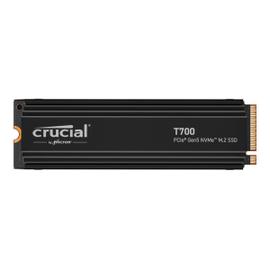
The Crucial T700 Pro is an excellent PCIe 5 SSD that offers outstanding performance. It can easily compete with the Corsair MP700 Pro, despite not having its own heatsink. This success attests to the quality of the product and the fact that users’ expectations have been met. In short, the Crucial T700 Pro easily delivers on its promises.
What is an SSD?
An SSD (Solid State Drive) is a type of data storage device used in computers and other electronic devices. Unlike traditional hard drives, which use spinning magnetic disks to store data, SSDs use NAND flash memory to permanently store data.
SSDs offer several advantages over traditional hard drives, such as much faster read and write speeds, lower power consumption, greater resistance to shock and vibration due to the absence of moving parts, and more compact physical dimensions. These advantages make it a popular choice for laptops, desktops, servers and many other electronic devices.
How do I install an M.2 NVMe SSD?
Installing an M.2 NVMe SSD is usually fairly straightforward, but may vary slightly depending on the specific hardware. Here are the general steps to do so:
- Turn off and unplug the computer.
- Open the computer case.
- Locate the M.2 slot on the motherboard.
- Insert the M.2 SSD into the slot.
- If necessary, secure the SSD.
- Close the computer case.
- Restart the computer.
- Configure the SSD if necessary.
After installation and configuration, the M.2 NVMe SSD should be ready for use as memory or as a boot drive, depending on the intended configuration.
What types of memory are available (SLC, MLC, TLC, QLC)?
There are different types of NAND memory used in SSDs, each with its own characteristics in terms of performance, durability and cost:
- SLC (Single-Level Cell): each memory cell stores a single bit of data. SSDs with SLC technology offer excellent performance and endurance, but tend to be more expensive due to their lower storage density.
- MLC (Multi-Level Cell): each memory cell stores multiple bits of data, typically two. MLC SSDs offer a compromise between performance, durability and cost, making them popular for a wide range of applications.
- TLC (triple-level cell): each memory cell stores three bits of data. TLC SSDs are cheaper to manufacture than SLC and MLC, but tend to have a slightly shorter lifetime and slightly lower performance.
- QLC (Quad-Level Cell): each memory cell stores four bits of data. QLC SSDs offer high storage density, making them attractive for cost-effective mass storage. However, they tend to have a shorter lifetime and lower performance than other types of NAND memory.
These different types of NAND memory offer consumers a choice between performance, lifetime and cost, depending on their specific storage needs.
What is the difference between SATA and NVMe SSDs?
SATA SSDs use the SATA interface and offer limited performance of up to 6 Gbps, suitable for consumer use. NVMe SSDs, on the other hand, use the PCIe interface and offer much higher data transfer speeds of up to several gigabytes per second, ideal for intensive workloads and high-end applications. In short, SATA SSDs are affordable and suitable for general use, while NVMe SSDs offer much better performance for more demanding requirements.
How to install an NVMe SSD in a PS5?
Installing an NVMe SSD in a PlayStation 5 (PS5 ) is possible, but it is important to note that not all NVMe SSDs are compatible due to certain performance requirements and technical specifications set by Sony. Here are the general steps to follow:
- Check the list of Sony-approved NVMe SSDs for compatibility.
- Turn off the PS5 and remove the side panel.
- Insert the NVMe SSD into the expansion slot.
- Replace the side panel.
- Turn on the PS5 and follow the on-screen instructions to format and configure the SSD.
It is imperative to follow the instructions provided by Sony and refer to the official documentation to ensure that the installation is done correctly and that the NVMe SSD is compatible with the PS5. Incorrect installation or use of an incompatible SSD may damage the console and void the warranty.
Is an SSD less reliable than a mechanical drive?
In general, SSDs are considered more reliable than mechanical hard drives. With no moving parts, the risk of mechanical failure is lower and their theoretical lifespan is generally longer. They are also more resistant to shock and vibration, but since SSDs can still suffer from electronic failures or software errors, regular backups of important data are necessary, regardless of the storage technology used. As a general rule, manufacturers grant a 3-5 year warranty on SSDs.