Charles TechCharles Tech
  • Tests High-Tech
    • Smartphones
      • iPhone
      • Asus
      • Huawei
      • Poco
      • Samsung
      • Xiaomi
    • Ordinateurs
      • PC fixe / gamer
      • PC portables
    • Composants PC
      • Cartes Graphiques
      • Processeurs
      • SSD
    • Eléctromenager
      • Aspirateurs robots
    • Périphériques
      • Claviers
      • Souris
  • Actu Tech
  • Bons plans
  • Dossiers
  • Guides d’achat
  • Tutos
  • English
    • Deutsch
    • Español
    • Italiano
    • Français
    • 日本語
    • Polski
Vous lisez How do I share a connection with an Android?
Font ResizerAa
Charles TechCharles Tech
Font ResizerAa
Rechercher ...
  • Tests High-Tech
    • Smartphones
    • Ordinateurs
    • Composants PC
    • Eléctromenager
    • Périphériques
  • Actu Tech
  • Bons plans
  • Dossiers
  • Guides d’achat
  • Tutos
  • English
    • Deutsch
    • Español
    • Italiano
    • Français
    • 日本語
    • Polski
Suivez-nous
Charles Tech > All our High-Tech tips and tutorials > How do I share a connection with an Android?

How do I share a connection with an Android?

Le Geek
Le Geek
Published: 28/04/2024
Last updated: 28/04/2024
Ce site utilise des liens affiliés qui participent aux revenus du site. En les utilisant, ça ne vous coûte pas plus cher, mais un pourcentage nous est reversé pour continuer à vous informer et à proposer des tests toujours plus complets.
Partager
Résumer avec :
ChatGPT ChatGPT
Grok Grok
Perplexity Perplexity
Claude Claude

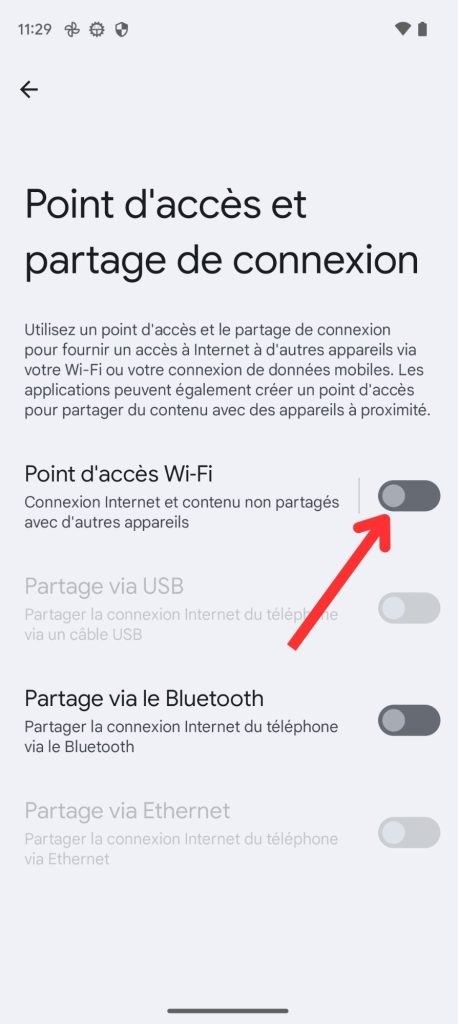
Connection sharing on Android is a powerful feature that lets users share their phone’s Internet connection with other devices. Whether you’re on the move, in a location without Wi-Fi access, or your ISP is having problems, Connection Sharing can save the day by allowing you to connect your other devices to the Internet. With Connection Sharing, you can turn your Android phone into a personal mobile hotspot. It creates a Wi-Fi network to enable other devices, such as laptops, tablets or other phones, to connect to the Internet via your mobile data connection. In this tutorial we’ll explain how to activate the connection sharing feature with an Android.

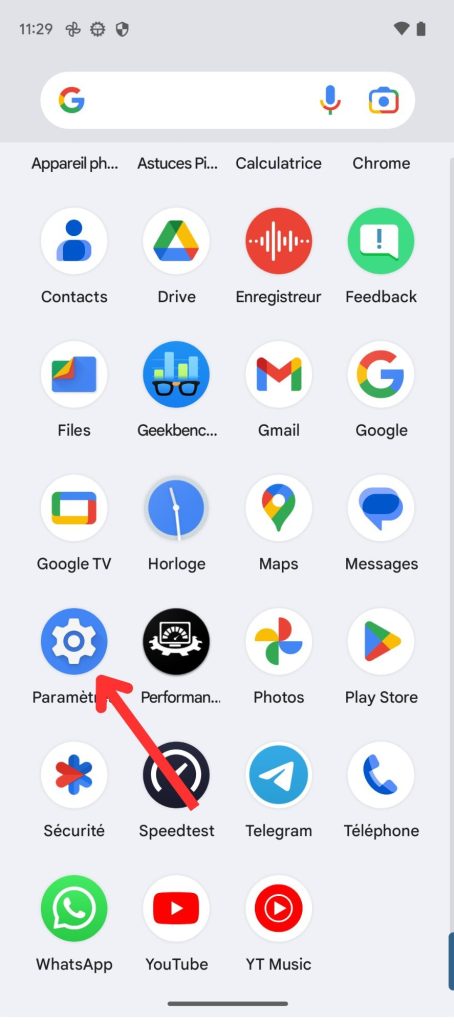
  1. Go to your Settings.tuto partage de connexion android
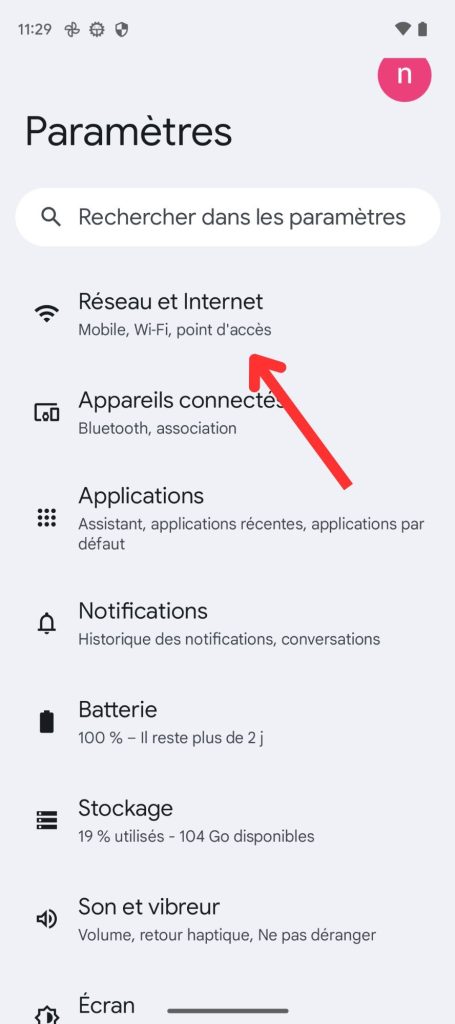
  2. Select “Network and Internet”.tuto partage de connexion android
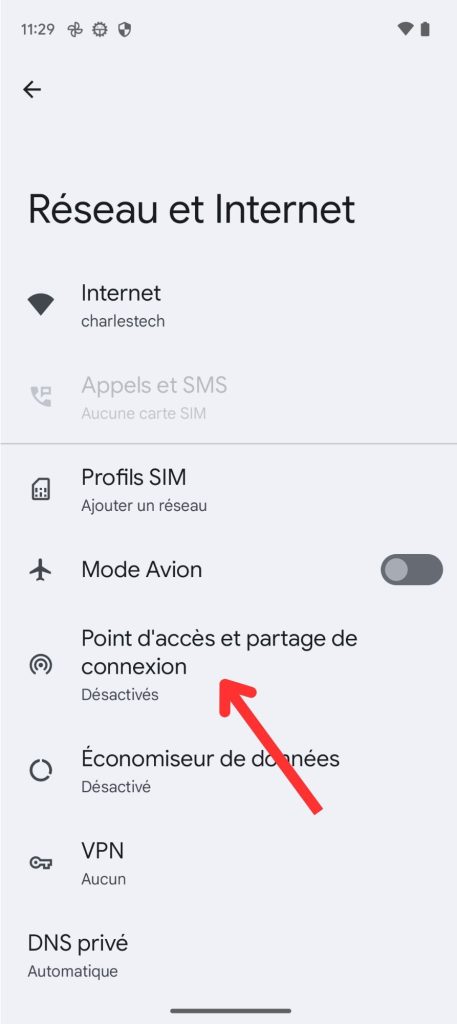
  3. Click on “Access point and connection sharing”.tuto partage de connexion android
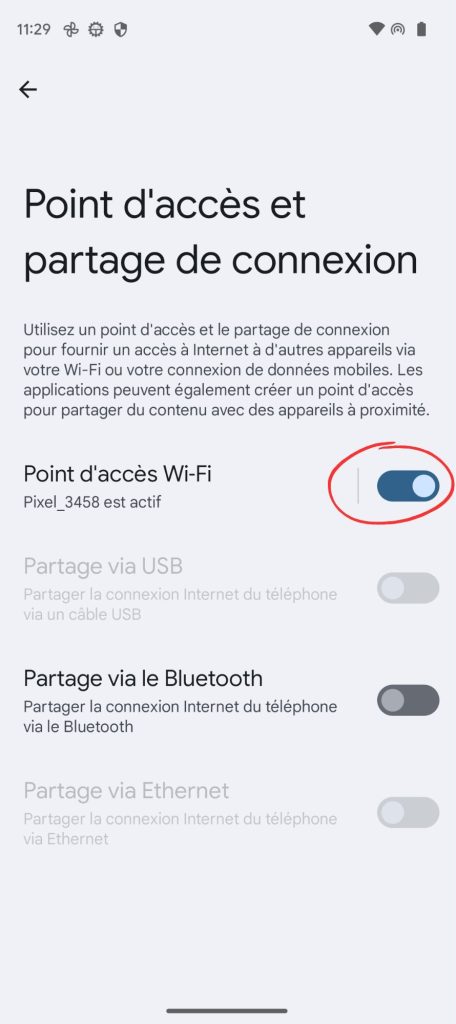
  4. Press “Wi-Fi access point”
    tuto partage de connexion android
    You’re now in connection sharing mode, so you can connect your devices to the Wi-Fi network created by your smartphone.
Partager cet article
Facebook Email Copy Link Imprimer
Laisser une note

Laisser une note Cancel reply

Your email address will not be published. Required fields are marked *

Sélectionnez une note

Notre partenaire

offre nordvpn

Réseaux sociaux

23kLike
38kSuivre
170Suivre
2.8kAbonnement
10.8kSuivre
1.1kSuivre
34Suivre

Vous aimerez aussi ...

google pay

Google Pay: What is it? How and why should you use it?

28/04/2024
word to pdf

How do I convert a Word document to PDF?

28/04/2024
smartlock

How do I activate SmartLock on an Android smartphone?

28/04/2024

How do I use iMessage on Chromebooks?

28/04/2024

A ne pas louper !

laifen wave acier
Prix sacrifié pour le Black Friday sur ces produits Laifen
Bons plans
laifen se lite
Black Friday : économisez 40% sur ces sèche-cheveux design de chez Laifen
Bons plans
laifen wave acier
Black Friday : ces brosses à dents connectées sont en promo exceptionnelle jusqu’à 40% de réduction dès aujourd’hui
Bons plans
  • Annoncer sur CharlesTech
  • Mentions légales
  • Contactez nous
  • À propos
  • Plan de site
© Charles Tech 2017 - 2025 - Toute reproduction (même partielle) interdite sous peine de poursuites.
Re !

Connectez-vous

Username or Email Address
Password

Vous avez perdu votre mot de passe ?