Charles TechCharles Tech
  • Tests High-Tech
    • Smartphones
      • iPhone
      • Asus
      • Huawei
      • Poco
      • Samsung
      • Xiaomi
    • Ordinateurs
      • PC fixe / gamer
      • PC portables
    • Composants PC
      • Cartes Graphiques
      • Processeurs
      • SSD
    • Eléctromenager
      • Aspirateurs robots
    • Périphériques
      • Claviers
      • Souris
  • Actu Tech
  • Bons plans
  • Dossiers
  • Guides d’achat
  • Tutos
  • English
    • Deutsch
    • Español
    • Italiano
    • Français
    • 日本語
    • Polski
Vous lisez How do I create a chat channel on Telegram?
Font ResizerAa
Charles TechCharles Tech
Font ResizerAa
Rechercher ...
  • Tests High-Tech
    • Smartphones
    • Ordinateurs
    • Composants PC
    • Eléctromenager
    • Périphériques
  • Actu Tech
  • Bons plans
  • Dossiers
  • Guides d’achat
  • Tutos
  • English
    • Deutsch
    • Español
    • Italiano
    • Français
    • 日本語
    • Polski
Suivez-nous
Charles Tech > All our High-Tech tips and tutorials > How do I create a chat channel on Telegram?

How do I create a chat channel on Telegram?

Vous aimeriez devenir propriétaire de votre propre canal Telegram mais vous ne savez pas comment vous y prendre ? Voici comment faire.
Charles Gouin-Peyrot
Published: 28/04/2024
Last updated: 28/04/2024
Ce site utilise des liens affiliés qui participent aux revenus du site. En les utilisant, ça ne vous coûte pas plus cher, mais un pourcentage nous est reversé pour continuer à vous informer et à proposer des tests toujours plus complets.
Partager
Résumer avec :
ChatGPT ChatGPT
Grok Grok
Perplexity Perplexity
Claude Claude

Chat channels are an ideal way to communicate on a large scale, and Telegram are most certainly the best in the business. Thanks to this, companies, celebrities or others can post news and more.

Creating a Telegram channel

To create your own Telegram channel, all you need to do is follow a few simple steps in a precise order. To do this, follow these instructions:

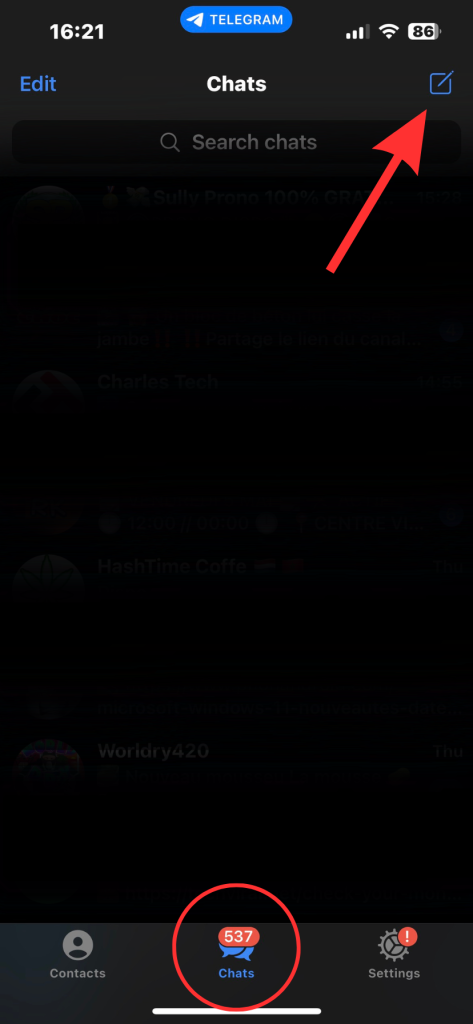
  • Once you’ve opened the application, go to the “Chats” category.
  • Press the pencil icon at the top right of your screen
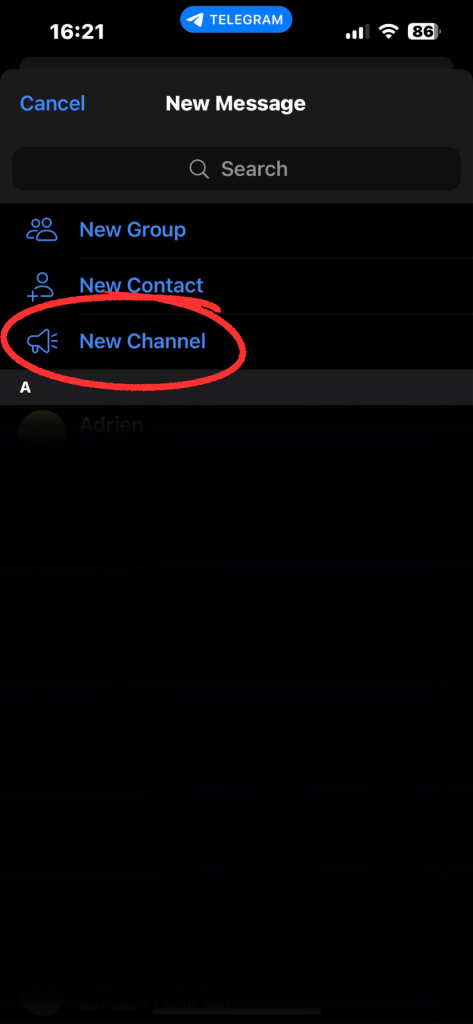
  • Select “New channel”.
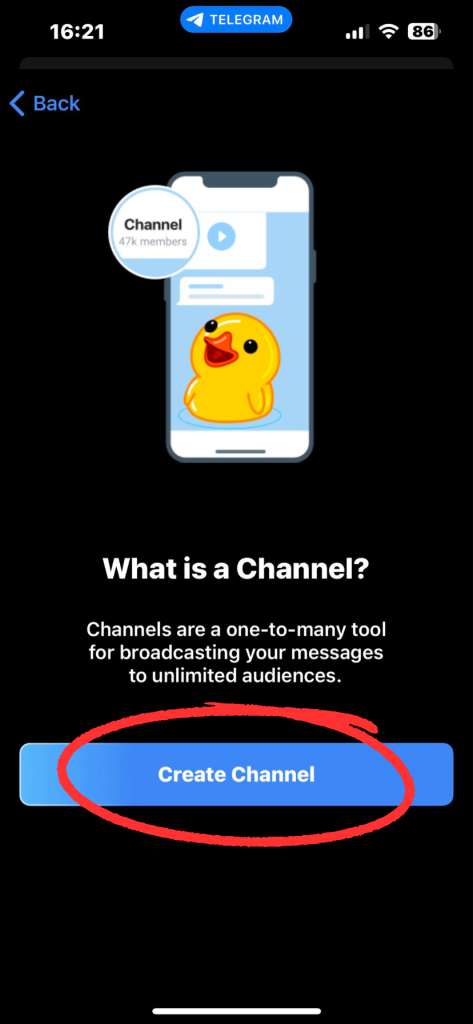
  • Confirm by pressing “Create a channel”.
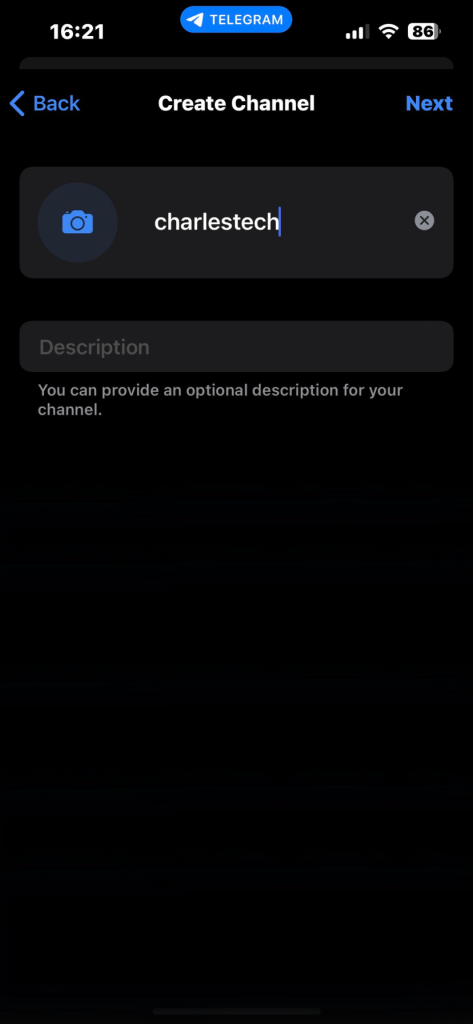
  • Complete the channel creation steps
  • Choose the scope of your channel (public or private) and assign it a URL
  • Invite the contacts you wish to appear in your channel
  • Start communicating

comment créer un canal telegram
Step 1: Go to the “Chats” section, then press the icon at the top right of your screen
comment créer un canal telegram
Step 2: Select “Create Channel
comment créer un canal telegram
Step 3: Press “Create Channel”
comment créer un canal telegram
Step 4: Fill in your channel information
comment créer un canal telegram
Step 2: Select “Create Channel”
You’re now in possession of your very own Telegram channel – have fun!

D'autres articles intéressants

How do I set parental controls on my iPhone?
How do I block unknown numbers on Android?
How to use Windows 11 without a Microsoft account
How to take a screenshot in Windows 11
How do I activate dark mode on Windows 11?
Partager cet article
Facebook Email Copy Link Imprimer
Laisser une note

Laisser une note Cancel reply

Your email address will not be published. Required fields are marked *

Sélectionnez une note

Notre partenaire

offre nordvpn

Réseaux sociaux

23KLike
38KSuivre
170Suivre
2.8KAbonnement
10.8KSuivre
1.1KSuivre
34Suivre

Vous aimerez aussi ...

How to avoid freeways with iPhone Maps?

28/04/2024
smartphone reconditionné

How do you save your voice messages on your iPhone?

28/04/2024
alway and display iphone 14 pro max

iPhone 14 Pro: Display Always on Display like Android

28/04/2024
smartlock

How do I activate SmartLock on an Android smartphone?

28/04/2024

A ne pas louper !

laifen wave acier
Prix sacrifié pour le Black Friday sur ces produits Laifen
Bons plans
laifen se lite
Black Friday : économisez 40% sur ces sèche-cheveux design de chez Laifen
Bons plans
laifen wave acier
Black Friday : ces brosses à dents connectées sont en promo exceptionnelle jusqu’à 40% de réduction dès aujourd’hui
Bons plans
  • Annoncer sur CharlesTech
  • Mentions légales
  • Contactez nous
  • À propos
  • Plan de site
© Charles Tech 2017 - 2025 - Toute reproduction (même partielle) interdite sous peine de poursuites.
Re !

Connectez-vous

Username or Email Address
Password

Vous avez perdu votre mot de passe ?